

表格设置
允许用户自己调整表头 显示、顺序、固定、宽度 时使用
提示
- 表格出现下列形式将
无法调整宽度- 多级表头
- 配置文件中有title属性,但表头自定义时没有title属性对应的值
table-setting组件没有置于a-table组件的#title插槽中
- 使用时请将
columns属性设置为响应式结构,否则修改不会生效
基础用法
引入组件import TableSetting from "@/components/table-setting/index.vue" 后通过通过v-model绑定columns即可,同一vue组件有多个表格需指定settingKey,应在a-table的#title插槽中使用
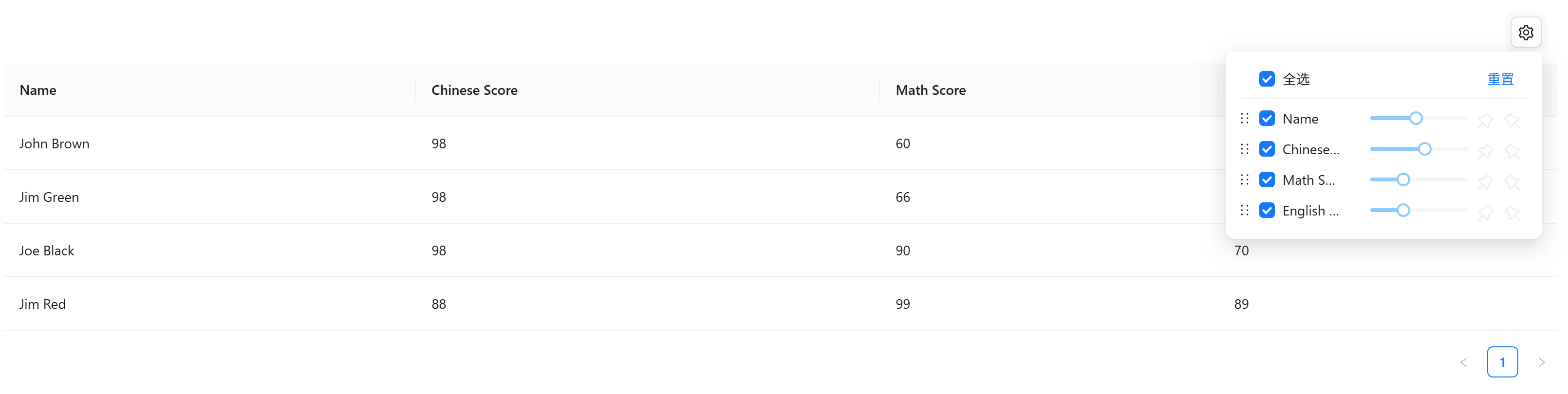
vue
<template>
  <a-typography-title :level="4">基础用法</a-typography-title>
  <a-table :columns="columns" :data-source="data">
    <template #title>
      <a-flex>
        <table-setting v-model="columns" settingKey="1"/>
      </a-flex>
    </template>
  </a-table>
</template>
<script lang="ts" setup>
import TableSetting from "@/components/table-setting/index.vue";
import {ref} from "vue";

const columns = ref([
  {
    title: 'Name',
    dataIndex: 'name',
    key: 'name',
  },
  {
    title: 'Chinese Score',
    dataIndex: 'chinese',
    key: 'chinese',
  },
  {
    title: 'Math Score',
    dataIndex: 'math',
    key: 'math',
  },
  {
    title: 'English Score',
    dataIndex: 'english',
    key: 'english',
  },
]);

const data = [
  {
    key: '1',
    name: 'John Brown',
    chinese: 98,
    math: 60,
    english: 70,
  },
  {
    key: '2',
    name: 'Jim Green',
    chinese: 98,
    math: 66,
    english: 89,
  },
  {
    key: '3',
    name: 'Joe Black',
    chinese: 98,
    math: 90,
    english: 70,
  },
  {
    key: '4',
    name: 'Jim Red',
    chinese: 88,
    math: 99,
    english: 89,
  },
];
</script>
API
双向绑定
| 属性名称 | 描述 | 类型 | 默认值 | 是否必填 |
|---|---|---|---|---|
| v-model | 双向绑定 | a-table中:columns相同 | - | 是 |
属性
| 属性名称 | 描述 | 类型 | 默认值 | 是否必填 |
|---|---|---|---|---|
| minWidth | 宽度调节最小值 | number | 80 | 否 |
| maxWidth | 宽度调节最大值 | number | 400 | 否 |
| settingKey | 组件唯一标识,同一vue组件中有多个table时区分使用 | string | - | 否 |