

简单树形选择
表单中需要可筛选关键字的树形选择时使用
提示
a-tree使用双向绑定时有多种类型(选中复选框/展开折叠/选中)而且单选和多选绑定返回的数据结构差异较大。所以将最常用的功能进行封装,单选绑定定义的key值,多选绑定key值数组。另外也将展开折叠、父子关联、全选功能也进行了封装,不需要对应功能时可通过属性关闭
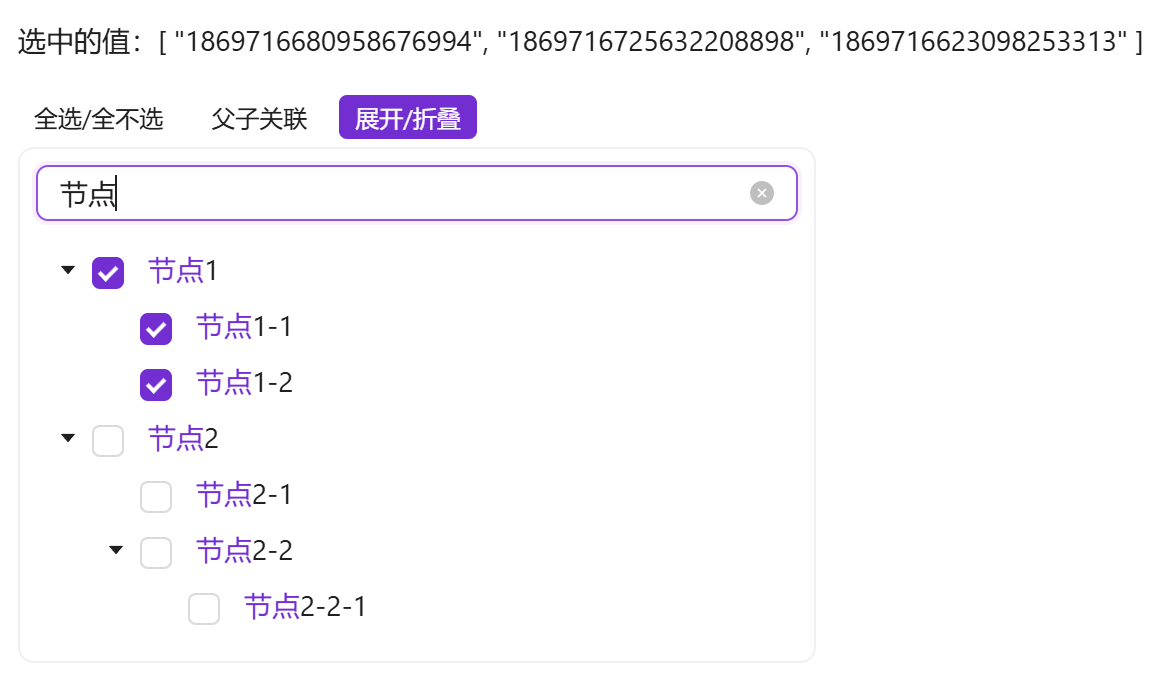
a-tree官方案例中有关键字检索的例子,但是由业务代码实现的,组件本身并没有封装。当多个业务都需要筛选树时,会造成重复代码过多的情况。所以将此功能也封装到组件中,不需要的话可通过属性关闭
基础用法
引入组件import EasyTreeSelect from '@/components/easy-tree-select/index.vue' 使用tree-data树形即可展示树形结构,使用v-model双向绑定获取选中的key值,默认为多选,v-model绑定的值为key值数组。
需确保tree-data属性传入的值是有效的。如果通过双向绑定或异步获取的值,需在组件中使用 v-if="data && data.length > 0"
vue
<template>
  <a-typography-title :level="4">最简单的树形选择</a-typography-title>
  <a-typography-text>选中的值:{{value}}</a-typography-text>
  <a-row>
    <a-col :span="6">
      <easy-tree-select v-if="test_tree.length > 0" :tree-data="test_tree" v-model="value"/>
    </a-col>
  </a-row>
</template>
<script setup lang="ts">
import EasyTreeSelect from '@/components/easy-tree-select/index.vue'
import {initDict} from "@/utils/Dict.ts"
import {ref} from "vue";
const {test_tree} = initDict("test_tree")
const value = ref<string[]>([])
</script>
单选的属性选择
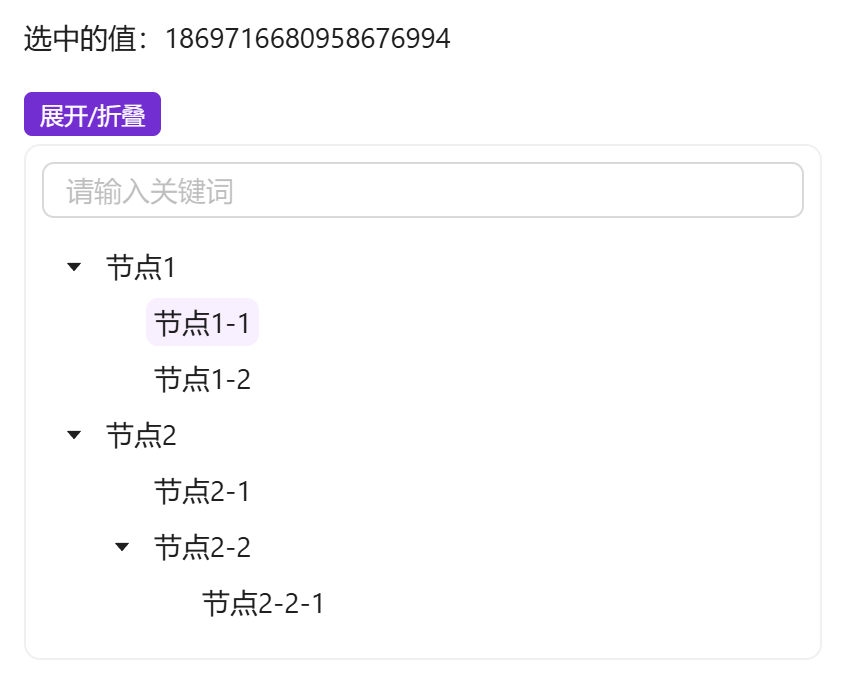
使用 :multiple="false" 来指定属性结构为单选模式,这时v-model绑定的值为key值
vue
<template>
  <a-typography-title :level="4">单选树形结构</a-typography-title>
  <a-typography-text>选中的值:{{value}}</a-typography-text>
  <a-row>
    <a-col :span="6">
      <easy-tree-select v-if="test_tree.length > 0" :tree-data="test_tree" v-model="value" :multiple="false"/>
    </a-col>
  </a-row>
</template>
<script setup lang="ts">
import EasyTreeSelect from '@/components/easy-tree-select/index.vue'
import {initDict} from "@/utils/Dict.ts"
import {ref} from "vue";
const {test_tree} = initDict("test_tree")
const value = ref<string>()
</script>
使用自定义插槽
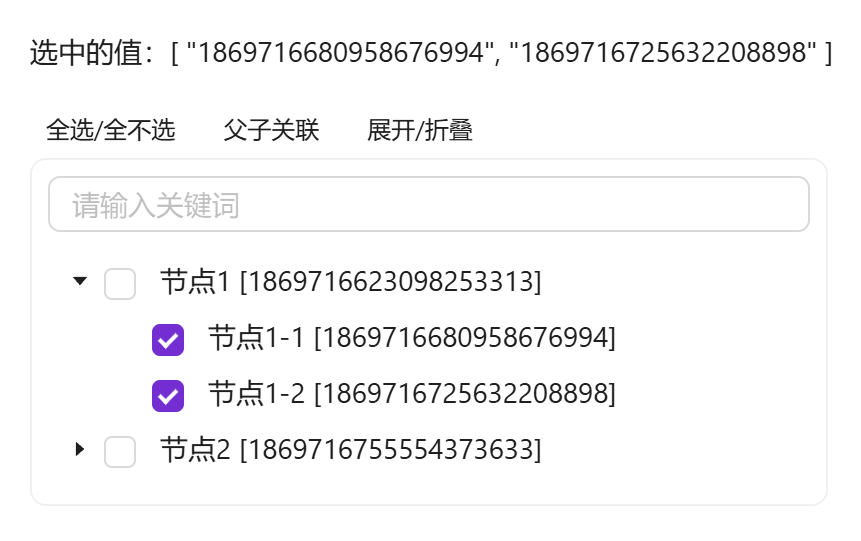
可自定义节点显示插槽,通过#title="{keyword, id, label}"可获取到关键词 keyword 及每个节点的item属性
vue
<template>
  <a-typography-title :level="4">自定义插槽</a-typography-title>
  <a-typography-text>选中的值:{{value}}</a-typography-text>
  <a-row>
    <a-col :span="6">
      <easy-tree-select v-if="test_tree.length > 0" :tree-data="test_tree" v-model="value">
        <template #title="{keyword,id,label}">
          {{label + ' [' + id + ']'}}
        </template>
      </easy-tree-select>
    </a-col>
  </a-row>
</template>
<script setup lang="ts">
import EasyTreeSelect from '@/components/easy-tree-select/index.vue'
import {initDict} from "@/utils/Dict.ts"
import {ref} from "vue";
const {test_tree} = initDict("test_tree")
const value = ref<string[]>([])
</script>
API
双向绑定
| 属性名称 | 描述 | 类型 | 默认值 | 是否必填 |
|---|---|---|---|---|
| v-model | 双向绑定 | 与Key定义类型相同(单选) Key类型数组(多选) | - | 是 |
属性
| 属性名称 | 描述 | 类型 | 默认值 | 是否必填 |
|---|---|---|---|---|
| treeData | 可选的树形结构数据 | 具有属性结构的数组 | - | 是 |
| fieldNames | 树形结构字段对应别名 | {children: string, title: string, key: string} | {children: 'children', title: 'label', key: 'id'} | 否 |
| defaultExpandAll | 默认展开全部(1.2.5) | boolean | false | 否 |
| checkStrictly | 父子关联(1.2.5) | boolean | false | 否 |
| multiple | 是否多选 | boolean | true | 否 |
| showToolbar | 显示工具栏 | boolean | true | 否 |
| showSearch | 显示搜索框 | boolean | true | 否 |
| searchPlaceholder | 搜索框提示词 | string | 请输入关键词 | 否 |
| bodyStyle | 树形卡片body样式 | Object | {padding: '8px',borderRadius: '8px'} | 否 |
| maxHeight | 最大高度 | number | - | 否 |
| bordered | 是否展示边框 | boolean | true | 否 |
插槽
| 插槽名称 | 描述 | 返回参数 | 是否必须 |
|---|---|---|---|
| title | 自定义树形节点插槽 | keyword及各个节点属性值 | 否 |
方法
| 方法名称 | 描述 | 参数 |
|---|---|---|
| change | 选中值变化时触发 | 选中的key(单选为key,多选为key数组) |