

字典标签
列表或页面中涉及字典翻译时使用
基础用法
- 引入组件
import DictTag from "@/components/dict-tag/index.vue" - 引入方法
import {initDict} from "@/utils/Dict",初始化字典选项const {sys_status} = initDict("sys_status") - 设置字典选项
:dict-data-option="sys_status" - 设置需要被翻译的值
dict-data-value="0"

vue
<template>
  <a-typography-title :level="4">最简单的字典回显</a-typography-title>
  <dict-tag dict-data-value="0" :dict-data-option="sys_status"/>
  <dict-tag dict-data-value="1" :dict-data-option="sys_status"/>
</template>

<script setup lang="ts">
import DictTag from "@/components/dict-tag/index.vue"
import {initDict} from "@/utils/Dict.ts"
const {sys_status} = initDict("sys_status")
</script>
树形字典回显
树形字典可通过配置full-tree-node属性来展示单节点或全路径,root-tree-node-prefix属性可指定根节点前缀
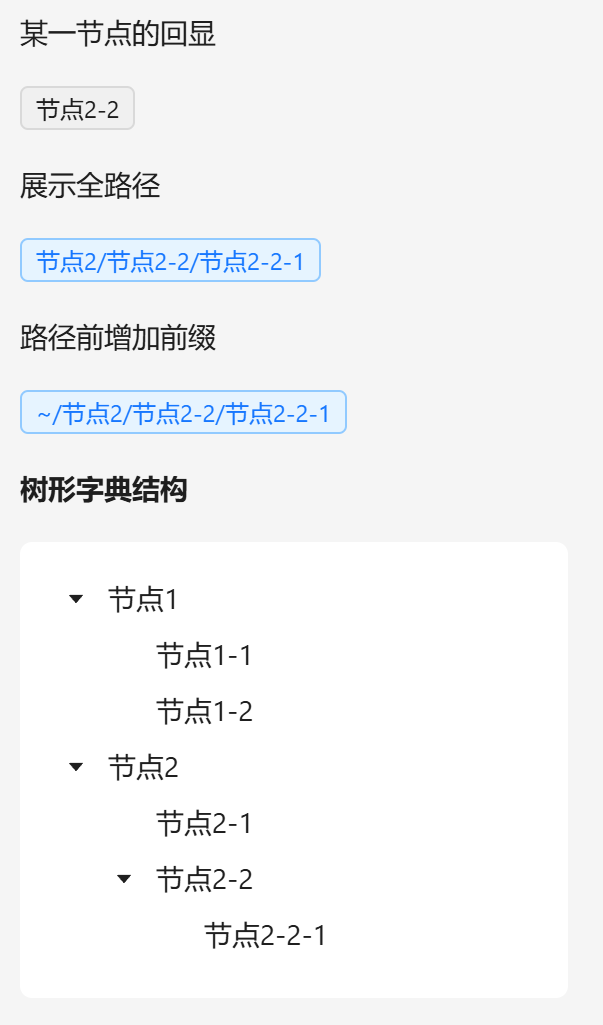
vue
<template>
  <a-typography-title :level="4">树形字典回显</a-typography-title>
  <a-typography>某一节点的回显</a-typography>
  <dict-tag dict-data-value="2-2" :dict-data-option="test_tree"/>
  <a-typography>展示全路径</a-typography>
  <dict-tag dict-data-value="2-2-1" :dict-data-option="test_tree" full-tree-node/>
  <a-typography>路径前增加前缀</a-typography>
  <dict-tag dict-data-value="2-2-1" :dict-data-option="test_tree" full-tree-node root-tree-node-prefix="~"/>

  <a-typography-text strong>树形字典结构</a-typography-text>
  <a-row>
    <a-col :span="4">
      <a-tree style="padding: 16px"
              v-if="test_tree.length"
              :tree-data="test_tree"
              :field-names="{children:'children', title:'label'}"
              default-expand-all/>
    </a-col>
  </a-row>
</template>

<script setup lang="ts">
import DictTag from "@/components/dict-tag/index.vue"
import {initDict} from "@/utils/Dict.ts"
const {test_tree} = initDict("test_tree")
</script>
API
属性
| 属性名称 | 描述 | 类型 | 默认值 | 是否必填 |
|---|---|---|---|---|
| dictDataOption | 字典集合 | SysDictDataType[] | - | 是 |
| dictDataValue | 被翻译的字典值 | string | - | 是 |
| bordered | 标签是否有边框 | boolean | true | 否 |
| style | 自定义标签样式 | Object | 否 | |
| fullTreeNode | 展示树型结构全路径 | boolean | false | 否 |
| fullTreeSeparator | 树型结构分隔符 | string | / | 否 |
| rootTreeNodePrefix | 树型跟节点前缀节点 | string | '' | 否 |