

附件上传
表单中需要附件上传时使用
基础用法
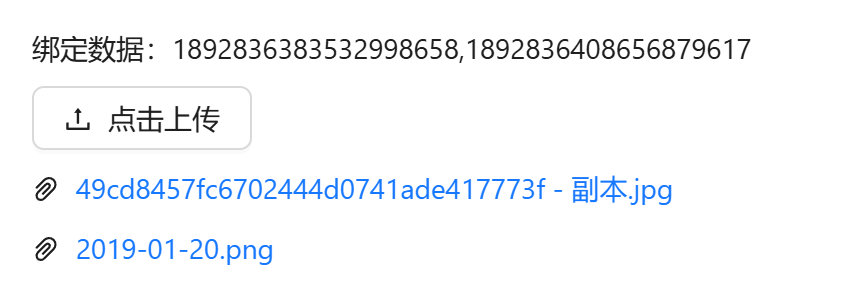
引入组件 import AttachmentUpload from "@/components/attachment-upload/index.vue" 使用v-model进行双向绑定即可。双向绑定的数据为逗号分隔格式,返回的数据为后台附件表sys_attachment的主键id
vue
<template>
  <a-flex vertical :gap="8">
    <a-typography-title :level="4">基础用法</a-typography-title>
    <a-typography-text>绑定数据:{{modelValue}}</a-typography-text>
    <attachment-upload v-model="modelValue"/>
  </a-flex>
</template>

<script setup lang="ts">
import AttachmentUpload from "@/components/attachment-upload/index.vue";
import {ref} from "vue";
const modelValue = ref<string>()
</script>
图片预览
设置model="picture"即可

vue
<template>
  <a-flex vertical :gap="8">
    <a-typography-title :level="4">图片预览</a-typography-title>
    <a-typography-text>绑定数据:{{modelValue}}</a-typography-text>
    <attachment-upload v-model="modelValue" model="picture"/>
  </a-flex>
</template>

<script setup lang="ts">
import AttachmentUpload from "@/components/attachment-upload/index.vue";
import {ref} from "vue";
const modelValue = ref<string>()
</script>
拖拽上传
设置model="dragger"即可

vue
<template>
  <a-flex vertical :gap="8">
    <a-typography-title :level="4">拖拽上传</a-typography-title>
    <a-typography-text>绑定数据:{{modelValue}}</a-typography-text>
    <attachment-upload v-model="modelValue" model="dragger"/>
  </a-flex>
</template>

<script setup lang="ts">
import AttachmentUpload from "@/components/attachment-upload/index.vue";
import {ref} from "vue";
const modelValue = ref<string>()
</script>
分片上传
分片上传也支持图片预览、拖拽上传模式
设置chunk="true" 即可,还可以设置每个片段大小,分片同时上传数量

vue
<template>
  <a-flex vertical :gap="8">
    <a-typography-title :level="4">分片上传</a-typography-title>
    <a-typography-text>绑定数据:{{modelValue}}</a-typography-text>
    <attachment-upload v-model="modelValue" :max-size="100" chunk :chunk-size="10" :chunk-upload-count="2"/>
  </a-flex>
</template>

<script setup lang="ts">
import AttachmentUpload from "@/components/attachment-upload/index.vue";
import {ref} from "vue";
const modelValue = ref<string>()
</script>
API
双向绑定
| 属性名称 | 描述 | 类型 | 默认值 | 是否必填 |
|---|---|---|---|---|
| v-model | 双向绑定 | string | - | 是 |
属性
| 属性名称 | 描述 | 类型 | 默认值 | 是否必填 |
|---|---|---|---|---|
| model | 模式切换 | button|picture|dragger | button | 否 |
| icon | 附件图标 | string(图标组件名称) | - | 否 |
| text | 描述文本 | string | - | 否 |
| uploadType | 可上传附件类型 | string[] | - | 否 |
| description | 详细说明(仅拖拽生效) | string | - | 否 |
| maxCount | 最大上传数量(超出后不会调用上传) | number | 10 | 否 |
| maxSize | 最大上传大小,分片上传注意调整大小(MB) | number | 10 | 否 |
| multiple | 是否支持多选(分片上传不支持) | boolean | true | 否 |
| directory | 是否支持文件夹上传(分片上传不支持) | boolean | false | 否 |
| businessCode | 业务编码 | string | 路由名称 | 否 |
| businessName | 业务名称 | string | 菜单名称 | 否 |
| chunk | 是否分片上传 | boolean | false | 否 |
| chunkSize | 最大分片大小 | number | 20 | 否 |
| chunkUploadCount | 分片同时上传数量 | number | 3 | 否 |
方法
| 方法名称 | 描述 | 参数 |
|---|---|---|
| uploadSuccess | 上传成功触发 | 附件,附件列表 |
| remove | 附件删除时触发 | 删除的附件 |
| uploadError | 上传失败触发 | 附件,失败原因 |
| exceedMaxCount | 超出附件最大数限制时触发 | 超出的附件 |