

颜色选择
表单中需要选择指定颜色时使用
基础用法
引入组件import ColorSelect from "@/components/color-select/index.vue"
v-model:color 对颜色值进行双向绑定
v-model:value="value" 对颜色key进行双向绑定
dataSource 指定颜色列表
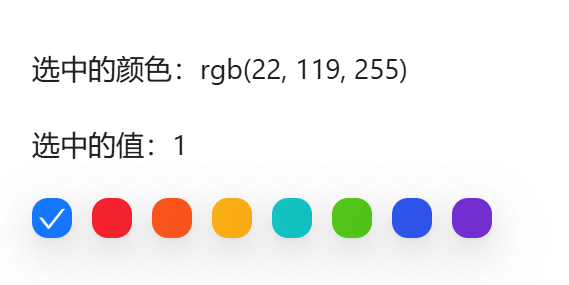
vue
<template>
  <a-typography-title :level="4">最简单的颜色选择</a-typography-title>
  <a-typography-text>选中的颜色:{{targetColor}}</a-typography-text>
  <a-typography-text>选中的值:{{targetKey}}</a-typography-text>
  <color-select :data-source="colorSource" v-model:color="targetColor" v-model:value="targetKey"/>
</template>

<script setup lang="ts">
import ColorSelect from "@/components/color-select/index.vue"
import {ref} from "vue";
const colorSource = [
  {
    name: '拂晓蓝',
    color: 'rgb(22, 119, 255)',
    key: '1'
  },
  {
    name: '薄暮',
    color: 'rgb(245, 34, 45)',
    key: '2'
  },
  {
    name: '火山',
    color: 'rgb(250, 84, 28)',
    key: '3'
  },
  {
    name: '日暮',
    color: 'rgb(250, 173, 20)',
    key: '4'
  },
  {
    name: '明青',
    color: 'rgb(19, 194, 194)',
    key: '5'
  },
  {
    name: '极光绿',
    color: 'rgb(82, 196, 26)',
    key: '6'
  },
  {
    name: '极客蓝',
    color: 'rgb(47, 84, 235)',
    key: '7'
  },
  {
    name: '酱紫',
    color: 'rgb(114, 46, 209)',
    key: '8'
  }
]

const targetColor = ref<string>()
const targetKey = ref<string>()
</script>
API
双向绑定
| 属性名称 | 描述 | 类型 | 默认值 | 是否必填 |
|---|---|---|---|---|
| v-model:color | 绑定的color值 | string | - | 否(至少绑定一个属性) |
| v-model:value | 绑定的key值 | string | - | 否(至少绑定一个属性) |
属性
| 属性名称 | 描述 | 类型 | 默认值 | 是否必填 |
|---|---|---|---|---|
| dataSource | 可选颜色数组 | Array<{ name: string, color: string, key?: string }> | - | 是 |
方法
| 方法名称 | 描述 | 参数 |
|---|---|---|
| click | 点选颜色时触发 | 选中的item对象 |