

Api
api目录主要负责与后端进行 Axios 通信,并集中维护项目中使用的 TypeScript 接口定义。
api 目录结构示意
/src/api/
├── global/                    		# 全局类型
│   └── type.ts               		# 全局响应类型定义
├── monitor/                    		# 监控模块
│   ├── cache/                 		# 缓存监控
│   ├── logged-user/           		# 在线用户
│   └── server/                		# 服务监控
├── system/                    		# 系统管理模块
│   ├── attachment/           		# 附件管理
│   │   ├── attachment-storage.ts 	# 附件业务API
│   │   └── type/  					# interface类型定义
│   │       └── sys-attachment.ts 	# 附件类型定义
│   ├── notice/               		# 通知公告
│   │   ├── notice.ts         		# 公告业务API
│   │   └── type/  					# interface类型定义
...									# 略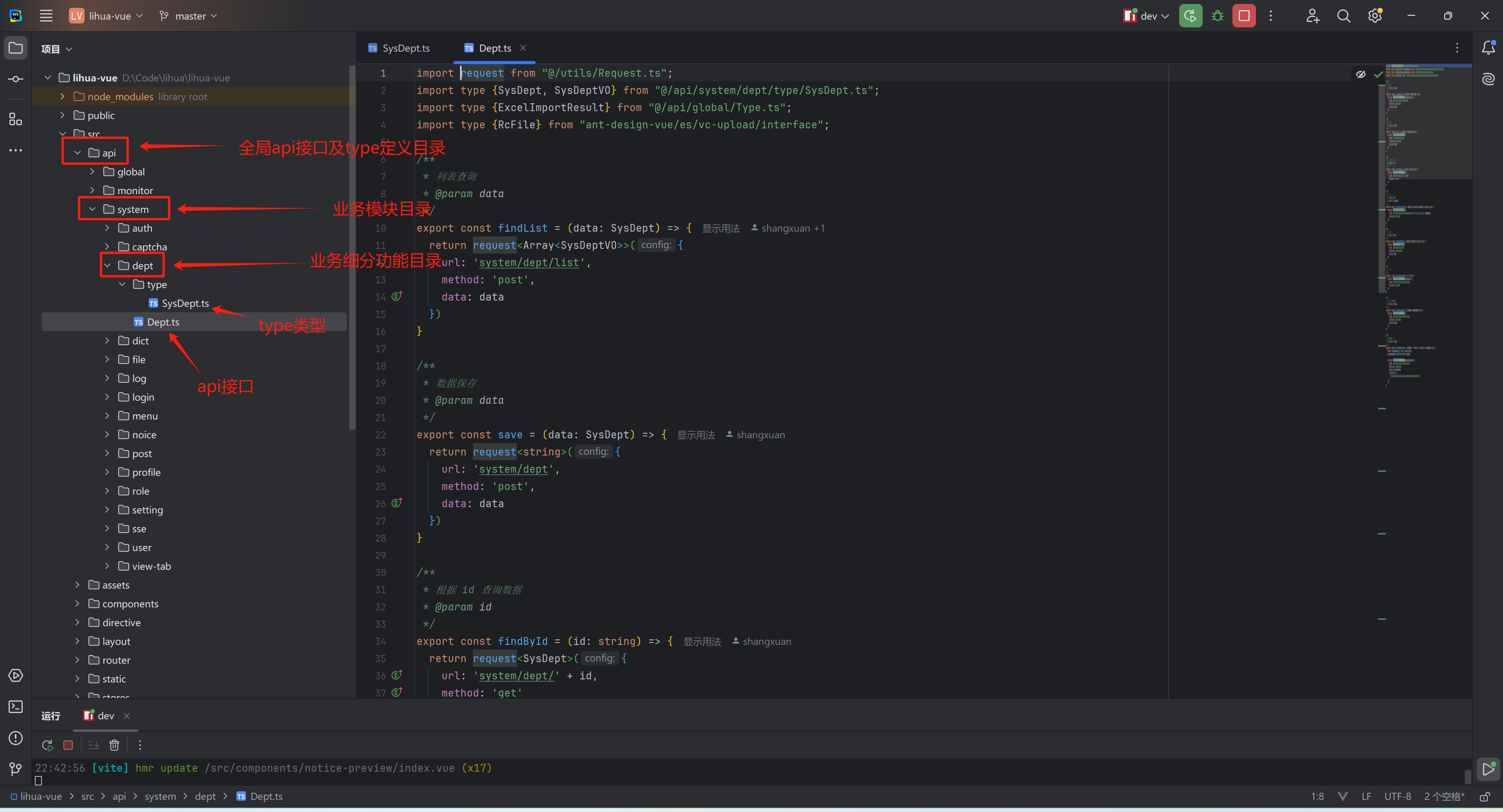
全局通用Type
/api/global/type.ts 中定义了全局公共的 interface包含:
- ResponseType<T>:后端接口通用返回包装对象
{code, msg, data} - PageResponseType<T>:后端分页查询接口返回包装对象
{current, pages, records, size, total} - MapResponseType<String,V>:后端Map接口返回包装对象
- BaseModalActiveType:基础模态框属性维护对象(弹窗约定,见页面与组件开发规范)
- ResponseError:可控的异常包装对象
模块Type
每个业务可在自己的模块下定义interface,在本模块的目录下新建 type/ 目录存放类型文件,export interface 类型供外部使用,例:
/**
 * 登陆成功后的认证数据信息,包含用户、角色、部门、岗位等所有信息
 */
export interface AuthInfoType {
    // 权限信息(菜单权限编码,角色编码集合)
    permissions: string[],
    // 所有角色信息
    roles: SysRole[],
    // 登陆用户信息
    userInfo: UserInfoType,
    // 部门信息
    depts: SysDept[],
    // 默认部门
    defaultDept: SysDept,
    // 岗位信息
    posts: SysPost[],
}
请求交互
request 使用
/src/utils/request.ts中封装的全局 axios 实例,如需修改全局请求配置,可在这里进行配置
request
baseURL取环境变量VITE_APP_BASE_API(开发环境/dev-api),默认请求头带Client-Type: web- 发送请求时经过请求拦截器,自动携带
Authorization: Bearer <token>请求头(token 持久化在localStorage['lihua_token'],由@/helpers/token经@vueuse的useStorage管理) - 接收响应时针对特殊业务码进行全局处理:
401登录失效:调用 userStore 的authenticationFailure(5 秒单飞窗内重复触发只执行一次:清空用户态 + 跳转登录页 + 错误提示)451非法访问:直接重定向到/451页面
- 错误处理分三种分支,提示文案 3 秒内去重(同文案并发失败不刷屏):
- 后端返回的业务异常(HTTP 200 + code 的 JSON 体):透传后端
msg提示 - 网关/服务器层错误(响应体为 HTML 或空,如 404/500/413):统一提示「服务暂时不可用,请稍后重试」,413 提示请求体超限
- 无响应(后端不可达/超时/DNS):提示「请求超时」或「网络异常」
- 后端返回的业务异常(HTTP 200 + code 的 JSON 体):透传后端
- 所有错误统一抛出
ResponseError(code, msg),catch中可用instanceof精确判断 - 封装了统一返回格式,响应数据自动包装为 ResponseType<T>,api中传入对应泛型即可
- 另导出
blobRequest:responseType固定为blob,直接返回Promise<Blob>,用于附件二进制下载
Api
api中需要引入 /utils/request ,按模块目录组织(xxx.ts 业务API + type/ 类型),使用具名导出并为每个方法编写 JSDoc 注释。request的参数为url data param method 等。使用时传入泛型类型,在业务中使用即可自动推导。request 返回值为 Promise<ResponseType<T>>,例:
定义api(以通知公告
api/system/notice/notice.ts为例)typescriptimport request from "@/utils/request.ts" import type {SysNotice, SysNoticeDTO, SysNoticeVO} from "@/api/system/notice/type/sys-notice.ts"; import type {PageResponseType} from "@/api/global/type.ts"; /** * 分页查询 * @param data */ export const queryPage = (data: SysNoticeDTO) => { return request<PageResponseType<SysNotice>>({ url: "/system/notice/page", method: "post", data: data }) } /** * 根据id查询 */ export const queryById = (id: string) => { return request<SysNoticeVO>({ url: "/system/notice/" + id, method: "get" }) } /** * 保存数据 * @param data */ export const save = (data: SysNoticeVO) => { return request<string>({ url: "/system/notice", method: "post", data: data }) } /** * 根据ids删除 * @param ids */ export const deleteByIds = (ids: string[]) => { return request({ url: '/system/notice', method: 'delete', data: ids }) }组件中使用
引入
api调用接口,此函数返回的都是异步操作,需要then().catch()或使用await语法糖接收返回和处理异常。消息反馈统一从@/antd-adapter引入message(经<a-app>上下文接线,主题算法才能生效),业务代码禁止直接 import antdv-next 的message/notification/Modal静态APItypescript<script lang="ts" setup> import {queryPage} from "@/api/system/notice/notice.ts"; import {message} from "@/antd-adapter"; const loadData = async () => { try { const resp = await queryPage(queryParam) if (resp.code === 200) { tableData.value = resp.data.records } else { message.error(resp.msg) } } catch (e) { if (e instanceof ResponseError) { message.error(e.msg) } else { console.error(e) } } } </script>异常处理
当发生异常后会进入
Promise的catch代码块,需要判断 err 类型进行处理有可控异常和不可控异常,可控异常为底层处理封装为
ResponseError对象的异常,可获取到异常码和异常信息。typescript// 异常类型是否为 ResponseError if (err instanceof ResponseError) { // 给出提示 message.error(err.msg) } else { // 打印log console.error(err) }