

简单树形选择
表单中需要可筛选关键字的树形选择时使用
提示
a-tree使用双向绑定时有多种类型(选中复选框/展开折叠/选中)而且单选和多选绑定返回的数据结构差异较大。所以将最常用的功能进行封装,单选绑定定义的key值,多选绑定key值数组。另外也将展开折叠、父子关联、全选功能也进行了封装,不需要对应功能时可通过属性关闭
a-tree官方案例中有关键字检索的例子,但是由业务代码实现的,组件本身并没有封装。当多个业务都需要筛选树时,会造成重复代码过多的情况。所以将此功能也封装到组件中,不需要的话可通过属性关闭
基础用法
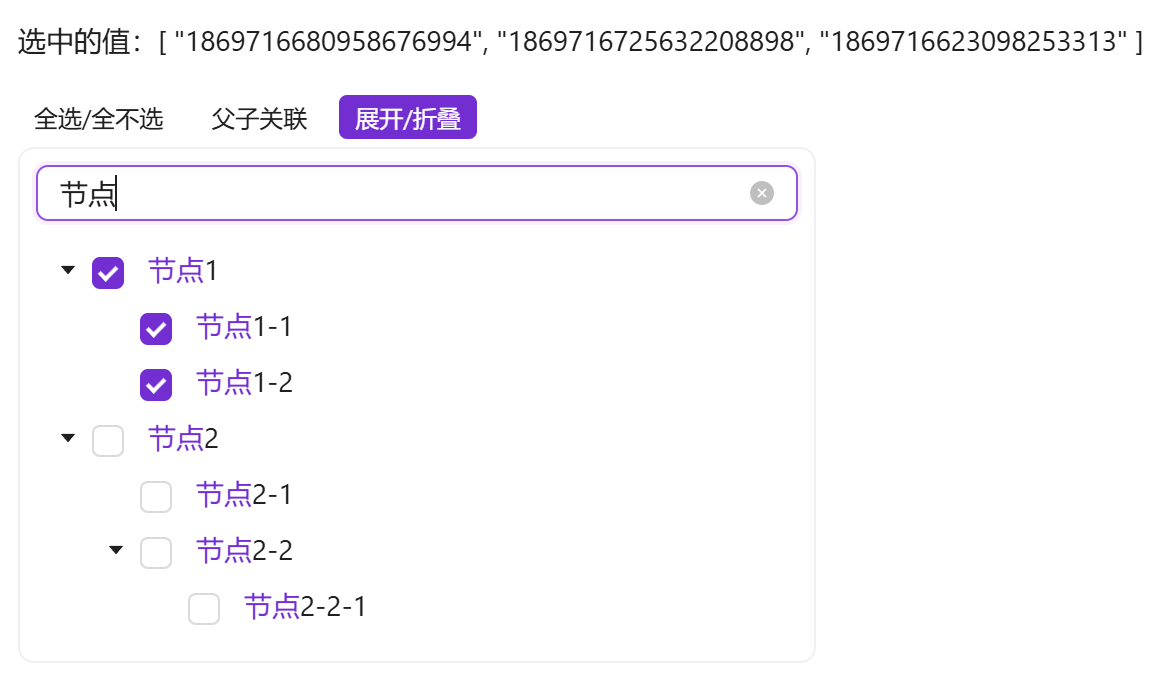
引入组件import EasyTreeSelect from '@/components/easy-tree-select/index.vue' 使用tree-data树形即可展示树形结构,使用v-model双向绑定获取选中的key值,默认为多选,v-model绑定的值为key值数组。
需确保tree-data属性传入的值是有效的。如果通过异步获取的值,需在组件中使用 v-if="data && data.length > 0"
<template>
  <a-typography-title :level="4">最简单的树形选择</a-typography-title>
  <a-typography-text>选中的值:{{value}}</a-typography-text>
  <a-row>
    <a-col :span="6">
      <easy-tree-select v-if="test_tree.length > 0" :tree-data="test_tree" v-model="value"/>
    </a-col>
  </a-row>
</template>
<script setup lang="ts">
import EasyTreeSelect from '@/components/easy-tree-select/index.vue'
import {initDict} from "@/helpers/dict"
import {ref} from "vue";
const {test_tree} = initDict("test_tree")
const value = ref<string[]>([])
</script>
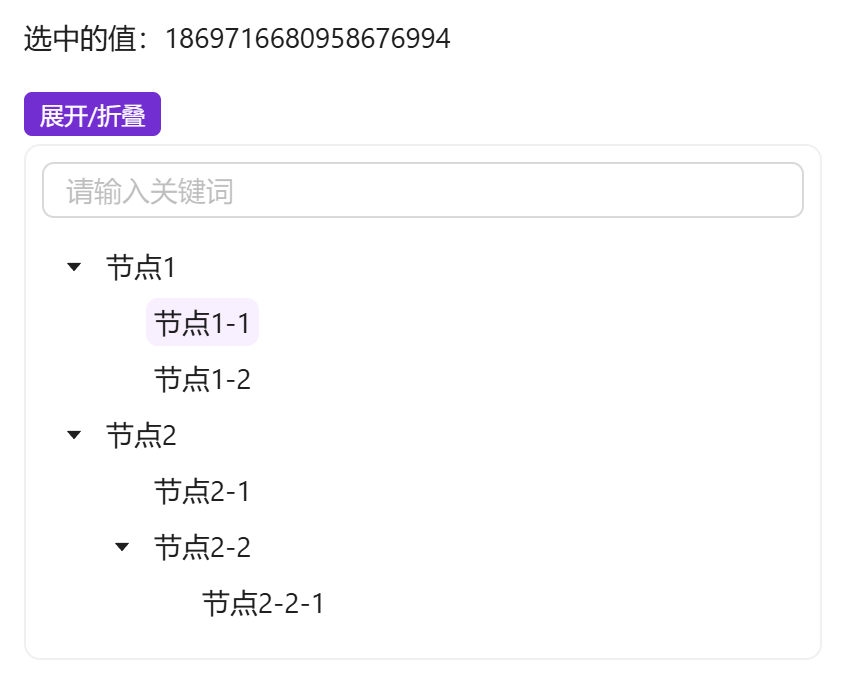
单选的树形选择
使用 :multiple="false" 来指定树形结构为单选模式,这时v-model绑定的值为key值
<template>
  <a-typography-title :level="4">单选树形结构</a-typography-title>
  <a-typography-text>选中的值:{{value}}</a-typography-text>
  <a-row>
    <a-col :span="6">
      <easy-tree-select v-if="test_tree.length > 0" :tree-data="test_tree" v-model="value" :multiple="false"/>
    </a-col>
  </a-row>
</template>
<script setup lang="ts">
import EasyTreeSelect from '@/components/easy-tree-select/index.vue'
import {initDict} from "@/helpers/dict"
import {ref} from "vue";
const {test_tree} = initDict("test_tree")
const value = ref<string>()
</script>
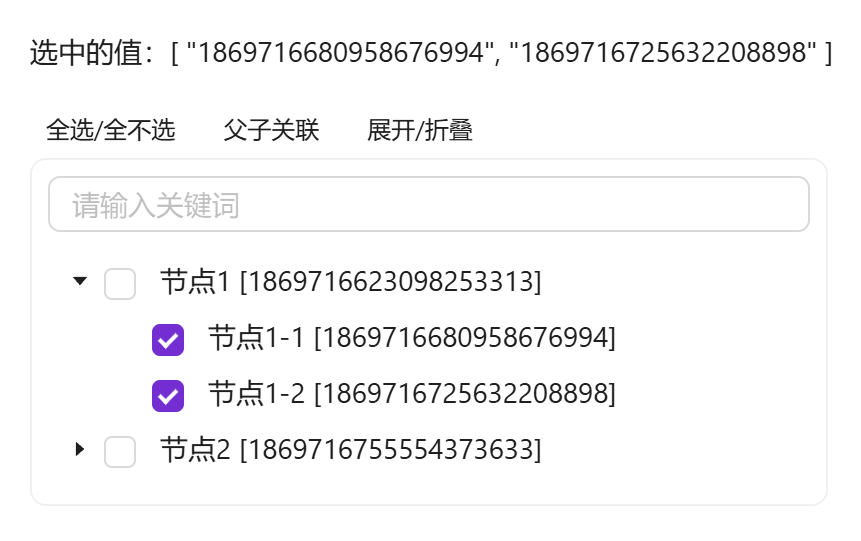
使用自定义插槽
可自定义节点显示插槽,通过#title="{keyword, segments, ...item}"可获取到关键词 keyword、关键词命中的高亮分段 segments 及每个节点的属性。不使用插槽时节点标题自带关键词命中高亮
<template>
  <a-typography-title :level="4">自定义插槽</a-typography-title>
  <a-typography-text>选中的值:{{value}}</a-typography-text>
  <a-row>
    <a-col :span="6">
      <easy-tree-select v-if="test_tree.length > 0" :tree-data="test_tree" v-model="value">
        <template #title="{keyword, segments, label, id}">
          {{label + ' [' + id + ']'}}
        </template>
      </easy-tree-select>
    </a-col>
  </a-row>
</template>
<script setup lang="ts">
import EasyTreeSelect from '@/components/easy-tree-select/index.vue'
import {initDict} from "@/helpers/dict"
import {ref} from "vue";
const {test_tree} = initDict("test_tree")
const value = ref<string[]>([])
</script>
虚拟滚动与容器滚动
两种滚动模式互斥,同传时以 height 为准:
- 虚拟滚动:设置
height(px,树渲染高度)后启用(配合virtual,默认 true),树体内部滚动、仅渲染可视区域节点,适合上千节点的大树 - 容器滚动:设置
max-height(px)时限制外层容器高度、超出滚动,节点 DOM 全量渲染,适合中小规模树
关键词过滤
搜索框按关键词过滤树(仅保留命中节点及其链路,命中片段高亮),输入经防抖处理(search-debounce 默认 300ms,大树可调大以减少过滤频率);过滤只影响展示,未显示的已勾选项保持不变。tree-data 刷新后会自动剔除已不存在于树中的勾选项,避免旧勾选残留污染双向绑定值
命令式 API
组件暴露了与工具栏同源的动作方法(基于当前可见节点范围):reset() 重置、checkAll() 全选、uncheckAll() 全不选、expandAll() 展开全部、collapseAll() 折叠全部
const treeRef = useTemplateRef<InstanceType<typeof EasyTreeSelect>>("treeRef")
// 重置组件:恢复展开与关联初始状态、全部取消选中、清空关键词
treeRef.value?.reset()
API
双向绑定
| 属性名称 | 描述 | 类型 | 默认值 | 是否必填 |
|---|---|---|---|---|
| v-model | 双向绑定 | 与Key定义类型相同(单选) Key类型数组(多选) | - | 是 |
属性
| 属性名称 | 描述 | 类型 | 默认值 | 是否必填 |
|---|---|---|---|---|
| treeData | 可选的树形结构数据 | 具有树形结构的数组 | - | 是 |
| fieldNames | 树形结构字段对应别名 | {children: string, title: string, key: string} | {children: 'children', title: 'label', key: 'id'} | 否 |
| defaultExpandAll | 是否默认展开全部 | boolean | false | 否 |
| checkRelate | 是否父子关联勾选 | boolean | false | 否 |
| multiple | 是否支持多选 | boolean | true | 否 |
| showToolbar | 显示工具栏 | boolean | true | 否 |
| showSearch | 显示搜索框 | boolean | true | 否 |
| searchPlaceholder | 搜索框提示词 | string | 请输入关键词 | 否 |
| searchDebounce | 搜索过滤防抖时间(ms) | number | 300 | 否 |
| bodyStyle | 树形卡片body样式 | Object | {padding: 'var(--ant-padding-xs)', borderRadius: 'var(--ant-border-radius-lg)'} | 否 |
| maxHeight | 可视最大高度(px):限制外层容器高度、超出滚动,节点全量渲染;与 height 互斥,同传时失效 | number | - | 否 |
| height | 树渲染高度(px):设置后启用虚拟滚动,适合大树;与 maxHeight 互斥,同传时优先 | number | - | 否 |
| virtual | 是否启用虚拟滚动(默认 true,需设置 height 后才生效) | boolean | true | 否 |
| bordered | 是否展示边框 | boolean | true | 否 |
插槽
| 插槽名称 | 描述 | 返回参数 | 是否必须 |
|---|---|---|---|
| title | 自定义树形节点插槽 | {keyword, segments, ...节点属性} | 否 |
事件
| 事件名称 | 描述 | 回调参数 |
|---|---|---|
| change | 选中值变化时触发 | 选中的key(单选为key,多选为key数组) |
方法
| 方法名称 | 描述 | 参数 |
|---|---|---|
| reset | 重置组件 | - |
| checkAll | 全选 | - |
| uncheckAll | 全不选 | - |
| expandAll | 展开全部 | - |
| collapseAll | 折叠全部 | - |