

颜色选择
表单中需要选择指定颜色时使用
基础用法
引入组件import ColorSelect from "@/components/color-select/index.vue"
v-model:color 对颜色值进行双向绑定
v-model:value="value" 对颜色key进行双向绑定
dataSource 指定颜色列表
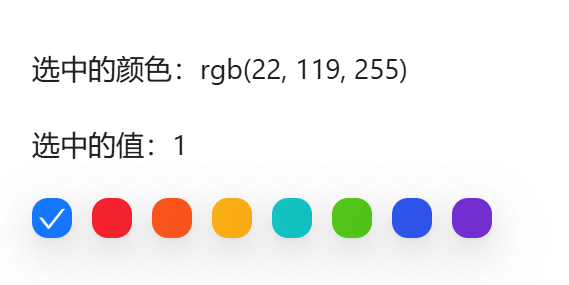
vue
<template>
  <a-typography-title :level="4">最简单的颜色选择</a-typography-title>
  <a-typography-text>选中的颜色:{{targetColor}}</a-typography-text>
  <a-typography-text>选中的值:{{targetKey}}</a-typography-text>
  <color-select :data-source="colorSource" v-model:color="targetColor" v-model:value="targetKey"/>
</template>

<script setup lang="ts">
import ColorSelect from "@/components/color-select/index.vue"
import {ref} from "vue";
const colorSource = [
  {
    name: '拂晓蓝',
    color: 'rgb(22, 119, 255)',
    key: '1'
  },
  {
    name: '薄暮',
    color: 'rgb(245, 34, 45)',
    key: '2'
  },
  {
    name: '火山',
    color: 'rgb(250, 84, 28)',
    key: '3'
  },
  {
    name: '日暮',
    color: 'rgb(250, 173, 20)',
    key: '4'
  },
  {
    name: '明青',
    color: 'rgb(19, 194, 194)',
    key: '5'
  },
  {
    name: '极光绿',
    color: 'rgb(82, 196, 26)',
    key: '6'
  },
  {
    name: '极客蓝',
    color: 'rgb(47, 84, 235)',
    key: '7'
  },
  {
    name: '酱紫',
    color: 'rgb(114, 46, 209)',
    key: '8'
  }
]

const targetColor = ref<string>()
const targetKey = ref<string>()
</script>
自定义颜色
开启 allow-custom 后(仅 v-model:color 模式生效),颜色列表尾部追加取色器入口。必须同时指定 custom-color-storage-key 作为自定义色的 localStorage 记忆键(共享键会跨场景相互覆盖,开启时未传会在控制台报错)。自定义入口为三态:未自定义时显示「A」标记(任意色入口);自定义过但当前选的是预置色时常显记忆色(可点击快捷重选);当前即自定义色时显示该色并打勾
vue
<template>
  <color-select :data-source="colorSource"
                v-model:color="targetColor"
                allow-custom
                custom-color-storage-key="my-scene-custom-color"/>
</template>
值与展示分离
选项支持 displayColor 字段:色块展示 displayColor,而 v-model:color 仍写入 color,用于「值与展示分离」的场景(如头像「跟随系统」存 'auto'、展示渐变色)。checkColor 可显式指定勾形颜色,未指定时按底色亮度动态取黑/白
vue
<template>
  <color-select :data-source="[{name: '跟随系统', color: 'auto', displayColor: 'linear-gradient(135deg, #667eea, #764ba2)'}]" v-model:color="mode"/>
</template>
API
双向绑定
| 属性名称 | 描述 | 类型 | 默认值 | 是否必填 |
|---|---|---|---|---|
| v-model:color | 绑定的color值 | string | - | 否(至少绑定一个属性) |
| v-model:value | 绑定的key值 | string | - | 否(至少绑定一个属性) |
属性
| 属性名称 | 描述 | 类型 | 默认值 | 是否必填 |
|---|---|---|---|---|
| dataSource | 可选颜色数组 | Array<{ name: string, color: string, key?: string, checkColor?: string, displayColor?: string }> | - | 是 |
| allowCustom | 自定义颜色入口开关(仅 v-model:color 模式生效),开启后尾部追加取色器项 | boolean | false | 否 |
| customColorStorageKey | 自定义色记忆的 localStorage 键(开启 allowCustom 时必传,共享键会跨场景相互覆盖) | string | - | 否(开启 allowCustom 时必填) |
事件
| 事件名称 | 描述 | 回调参数 |
|---|---|---|
| click | 点选颜色时触发 |