

附件上传
表单中需要附件上传时使用
基础用法
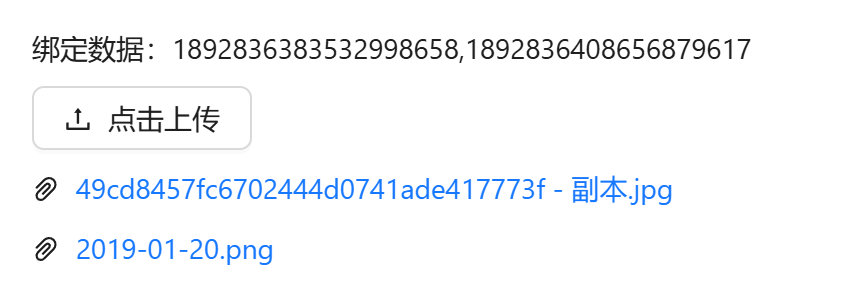
引入组件 import AttachmentUpload from "@/components/attachment-upload/index.vue" 使用v-model进行双向绑定即可。双向绑定的数据为逗号分隔格式,返回的数据为后台附件表sys_attachment的主键id
vue
<template>
  <a-flex vertical :gap="8">
    <a-typography-title :level="4">基础用法</a-typography-title>
    <a-typography-text>绑定数据:{{modelValue}}</a-typography-text>
    <attachment-upload v-model="modelValue"/>
  </a-flex>
</template>

<script setup lang="ts">
import AttachmentUpload from "@/components/attachment-upload/index.vue";
import {ref} from "vue";
const modelValue = ref<string>('')
</script>
图片预览
设置mode="picture"即可

vue
<template>
  <a-flex vertical :gap="8">
    <a-typography-title :level="4">图片预览</a-typography-title>
    <a-typography-text>绑定数据:{{modelValue}}</a-typography-text>
    <attachment-upload v-model="modelValue" mode="picture"/>
  </a-flex>
</template>

<script setup lang="ts">
import AttachmentUpload from "@/components/attachment-upload/index.vue";
import {ref} from "vue";
const modelValue = ref<string>('')
</script>
拖拽上传
设置mode="dragger"即可

vue
<template>
  <a-flex vertical :gap="8">
    <a-typography-title :level="4">拖拽上传</a-typography-title>
    <a-typography-text>绑定数据:{{modelValue}}</a-typography-text>
    <attachment-upload v-model="modelValue" mode="dragger"/>
  </a-flex>
</template>

<script setup lang="ts">
import AttachmentUpload from "@/components/attachment-upload/index.vue";
import {ref} from "vue";
const modelValue = ref<string>('')
</script>
分片上传
分片上传也支持图片预览、拖拽上传模式
设置chunk 即可,还可以设置每个片段大小,分片同时上传数量。分片上传会对文件计算 md5(hash-wasm),上传期间组件内展示「处理中/上传中/合并中」进度条;分片模式下不支持多选与文件夹上传

vue
<template>
  <a-flex vertical :gap="8">
    <a-typography-title :level="4">分片上传</a-typography-title>
    <a-typography-text>绑定数据:{{modelValue}}</a-typography-text>
    <attachment-upload v-model="modelValue" :max-size="100" chunk :chunk-size="10" :chunk-upload-count="2"/>
  </a-flex>
</template>

<script setup lang="ts">
import AttachmentUpload from "@/components/attachment-upload/index.vue";
import {ref} from "vue";
const modelValue = ref<string>('')
</script>
业务删除
设置 auto-remove 后,点击附件列表的删除按钮会弹确认框,确认后自动执行业务删除并回传业务结果;也可通过 ref 调用组件暴露的 businessRemove 方法手动触发。未开启时删除仅从列表移除,回传列表内移除的文件对象
API
双向绑定
| 属性名称 | 描述 | 类型 | 默认值 | 是否必填 |
|---|---|---|---|---|
| v-model | 双向绑定 | string | '' | 是 |
属性
| 属性名称 | 描述 | 类型 | 默认值 | 是否必填 |
|---|---|---|---|---|
| mode | 模式:按钮/图片/拖拽 | 'button' | 'picture' | 'dragger' | 'button' | 否 |
| icon | 附件图标 | string(图标组件名称) | - | 否 |
| text | 描述文本 | string | - | 否 |
| uploadType | 可上传的附件类型 | string[] | - | 否 |
| description | 详细说明(仅支持拖拽上传) | string | - | 否 |
| maxCount | 最大上传数量(超出后不会调用上传) | number | 10 | 否 |
| maxSize | 最大上传大小,分片上传注意调整大小(mb) | number | 10 | 否 |
| multiple | 是否支持多附件上传(分片上传不支持) | boolean | true | 否 |
| directory | 是否支持附件夹上传(分片上传不支持) | boolean | false | 否 |
| businessCode | 业务编码 | string | 路由名称 | 否 |
| businessName | 业务名称 | string | 菜单名称 | 否 |
| chunk | 是否分片上传 | boolean | false | 否 |
| chunkSize | 最大分片片段大小 | number | 20 | 否 |
| chunkUploadCount | 分片上传同时上传数量 | number | 3 | 否 |
| fileName | 指定附件名称(自动保留原附件扩展名) | string | - | 否 |
| autoRemove | 自动删除(点击删除按钮是否自动进行业务删除) | boolean | false | 否 |
| public | 公开附件模式:上传公开附件,双向绑定收发附件 path(对象键)而非附件 id;免登录可下载(App 安装包等),列表删除仅解除引用不做业务删除 | boolean | false | 否 |
事件
| 事件名称 | 描述 | 回调参数 |
|---|---|---|
| uploadSuccess | 上传成功触发 | |
| remove | 附件移除时触发 | 列表内移除回调整文件对象;autoRemove 确认删除回传 { id, status } 业务结果 |
| uploadError | 上传失败触发 | (file, errorMsg?) |
| exceedMaxCount | 超出附件最大数限制被拒收时触发 | 超出的附件 |
方法
| 方法名称 | 描述 | 参数 |
|---|---|---|
| businessRemove | 手动触发业务删除 | - |