

图片裁剪
需要进行图片裁剪时使用
提示
此组件为vue-cropper的二次封装,如需修改组件,请参考官方文档
双向绑定v-model:realTime并不适合绑定直接存储到数据库的字段,主要用于获取到返回对象进行预览
双向绑定v-model:img并不适合绑定直接存储到数据库的字段,主要用于图片回显和删除图片时将绑定属性值一并删除
基础用法
引入组件import ImageCropper from "@/components/image-cropper/index.vue"通过v-model:real-time获取实时预览的图片对象。通过v-model:img="image"获取上传的图片临时地址,可用于判断是否已上传了图片。组件工具条内置上传、左右旋转、放大缩小与删除操作,滚轮缩放预览自动同步
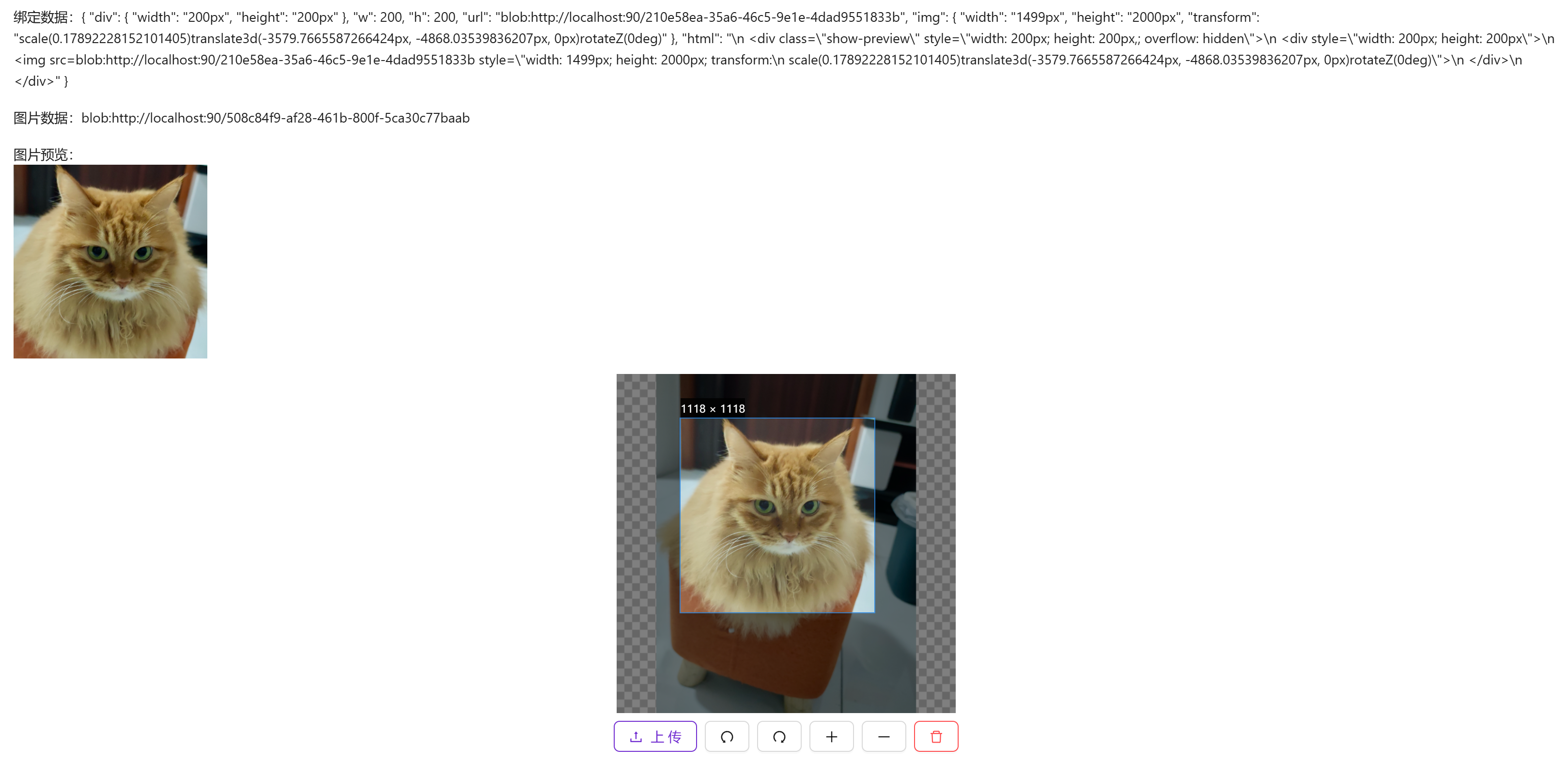
vue
<template>
  <a-typography-title :level="4">基础用法</a-typography-title>
  <a-typography-text>绑定数据:{{value}}</a-typography-text>
  <a-typography-text>图片数据:{{image}}</a-typography-text>
  <a-typography-text>图片预览:  <div v-if="value && value.html" v-html="value.html"></div></a-typography-text>

  <image-cropper v-model:real-time="value" v-model:img="image"/>
</template>

<script setup lang="ts">
import ImageCropper from "@/components/image-cropper/index.vue"
import type {CropperDataType} from "@/components/image-cropper/CropperType.ts";
import {ref} from "vue";
const value = ref<CropperDataType>()
const image = ref<string>()
</script>
完整使用
一般来说存储到数据库的数据为图片地址,需配合组件获取二进制文件后上传到服务器,保存文件上传后返回的地址。需要使用按钮或其他方式调用上传文件的函数
vue
<template>
  <image-cropper v-model:img="image" ref="imageCropperRef"/>
  <a-button @click="handleUpload">上 传</a-button>
</template>

<script setup lang="ts">
import ImageCropper from "@/components/image-cropper/index.vue"
import {ref, useTemplateRef} from "vue";
import {message} from "@/antd-adapter";
import {uploadAttachment} from "@/api/system/attachment/attachment-storage.ts";
// 图片裁剪组件的ref
const imageCropperRef = useTemplateRef<InstanceType<typeof ImageCropper>>("imageCropperRef")
const image = ref()

// 处理上传图片
const handleUpload = async () => {
  // 判断图片是否上传
  if (!image.value) {
    message.error("请上传图片")
    return;
  }
  // 判断图片剪裁组件是否加载正常
  if (!imageCropperRef.value) {
    message.error("image-cropper 实例加载失败")
    return;
  }

  // 通过ref调用到getBlob()方法获取裁剪后的图片二进制文件
  const blob = await imageCropperRef.value.getBlob()

  if (!blob) {
    message.error("获取blob失败")
    return;
  }

  // 调用uploadAttachment方法将文件上传到服务器
  const resp = await uploadAttachment(new File([blob], "avatar.png", {type: blob.type}));

  if (resp.code === 200) {
    // 最终获取服务器中的图片地址,可保存到数据库
    const imagePath = resp.data.url
  }
}
</script>
API
双向绑定
| 属性名称 | 描述 | 类型 | 默认值 | 是否必填 |
|---|---|---|---|---|
| v-model:real-time | 获取实时剪裁的图片信息 | CropperDataType | - | 否 |
| v-model:img | 获取上传的图片浏览器临时地址(删除图片时回写 null) | string | - | 否 |
属性
| 属性名称 | 描述 | 类型 | 默认值 | 是否必填 |
|---|---|---|---|---|
| outputSize | 裁剪生成的图片质量(0.1 ~ 1) | number | 1 | 否 |
| outputType | 裁剪生成图片的格式(jpeg| png| webp) | string | png | 否 |
| info | 裁剪框的大小信息 | boolean | true | 否 |
| canScale | 图片是否允许滚轮缩放 | boolean | true | 否 |
| autoCrop | 是否默认生成截图框 | boolean | true | 否 |
| autoCropWidth | 默认生成截图框宽度 | number | 200 | 否 |
| autoCropHeight | 默认生成截图框高度 | number | 200 | 否 |
| fixedBox | 固定截图框大小 不允许改变 | boolean | true | 否 |
| fixed | 是否开启截图框宽高固定比例 | boolean | true | 否 |
| fixedNumber | 截图框的宽高比例 [ 宽度 , 高度 ] | Array | [1, 1] | 否 |
| canMove | 上传图片是否可以移动 | boolean | true | 否 |
| canMoveBox | 截图框能否拖动 | boolean | true | 否 |
| original | 上传图片按照原始比例渲染 | boolean | false | 否 |
| centerBox | 截图框是否被限制在图片里面 | boolean | true | 否 |
| infoTrue | 是否展示真实输出图片宽高 | boolean | true | 否 |
| full | 是否输出原图比例的截图 | boolean | false | 否 |
| enlarge | 图片根据截图框输出比例倍数 | number | 1 | 否 |
| mode | 图片默认渲染方式 | contain , cover, 100px, 100% auto | contain | 否 |
| wight | 画布宽度(历史拼写,对外 API 不改) | string | '350px' | 否 |
| height | 画布高度 | string | '350px' | 否 |
方法
| 方法名称 | 描述 | 参数 | 返回值 |
|---|---|---|---|
| getBlob | 获取裁剪后的图片二进制 | - | Promise<Blob> |